
First, a short note on the organisation ANSI itself. Because even though this post is about ANSI encoding, it’s worth understanding what ANSI as the American National Standard Institute really is, and what they do:
The Institute oversees the creation, promulgation and use of thousands of norms and guidelines that directly impact businesses in nearly every sector: from acoustical devices to construction equipment, from dairy and livestock production to energy distribution, and many more.
In other words, they standardise things, to enhance both the global competitiveness of U.S. business and the U.S. quality of life. ANSI is also the official U.S. representative to the International Organization for Standardization (ISO).
Now, over to ANSI Encoding
I read an incredibly clarifying comment from Michael Kay once, that I found quite informative. I have always thought that ANSI encoding had a lot to do with ANSI, the American National Standard Institute, and that it was maintained by this organisation – hence the name ANSI.
Now my understanding is that although the encoding once was connected to the organisation, it no longer is. At least not the way I thought.
Back in the days, Microsoft wanted to use international standard encoding.
They saw the world was moving away from 7-bit character sets(ASCII), and over to 8-bit encoding (ISO-8859-1), and they realised they needed some kind of standard encoding. (And then to change it their way, I mean, what’s the point in buying a standard, and then just keep it that way, you know? (!)…) So, to get an international standard in the US, you go to the American National Standards Institute and buy it from them, right? yes.
ANSI republish international standards with their own branding and numbers, (as Americans have a tendency to do, e.g. the imperial and U.S. customary units, NTSC, to mention a few) and that is exactly what they did with the international standard ISO-8859 family about 35 years ago. Microsoft bought the ISO-8859 from American National Standards Institute – but now under the name “ANSI” instead.
Microsoft had little knowledge of the organisation ANSI back then (and the fact that ANSI published many many other standards as well), so they referred to the standards in the ISO-8859 family (and the following versions they developed themselves) by the name of the cover they received from ANSI when they bought it. And what did the cover say? exactly. “ANSI”
The name has been stuck ever since. It’s been used in Microsoft documentation for years and therefore also adapted by the users.
Here is a screenshot from my laptop, showing you the name ANSI is still used on Microsoft computers. (e.g. the notepad application. I will get back to that).

But what is ANSI encoding exactly??
ANSI encoding refers to a standard code page in a system, usually Windows. On US and Western European default settings, “ANSI” maps to Windows Code Page 1252. Windows-1252 is also referred to as Windows Latin-1. (As seen below).
ANSI can also represent certain other Windows code pages on other systems, so using ANSI to identify external encoding is not ideal. Just look at this list for example, they’re all ANSI encodings, but they are all different Window Code Pages (hereinafter Windows CP):
- Windows-1250 ( Central Europe )
- Windows-1251 ( Cyrillic )
- Windows-1252 ( Latin )
- Windows-1253 ( Greek )
- Windows-1254 ( Turkish )
- Windows-1255 ( Hebrew )
- Windows-1256 ( Arabic )
- Windows-1257 ( Baltic )
- Windows-1258 ( Vietnamese )
- Windows-874 ( Thai )
- Windows-932 ( Japanese )
- Windows-936 ( Simple Chinese )
- Windows-949 ( Korean )
- Windows-950 ( Traditional Chinese )
So really, the word ‘ANSI’ in Windows software, should be replaced with ‘Default Windows CP’ That way you wouldn’t be in doubt when converting to Default Windows CP or encode in Default Windows CP (instead of convert to ANSI, or encode in ANSI).
Technically, ANSI should be the same as ASCII. (The standard ASCII scheme has only 128 character positions. The rest is undefined. (128-255)) And it’s the same with ANSI. All the Windows CP mentioned above agree on the character positions below 128, but there are many different ways to handle the characters from 128 and up. (depending on country/area you live in, as you can see).
Strictly speaking, there is no such thing as ANSI encoding. The term ANSI is used for several different encodings, get it?
It’s not part of the official unicode standards, but it is common because Microsoft dominates the market.
When using Notepad, or Notepad++ you might get an error when trying to save the file if it contains unknown characters or icons, that does not comply with your specific Windows CP. Here is an example:
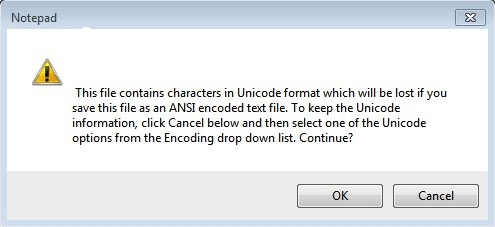
The file contains characters in Unicode format which will be lost if you save this file as ANSI encoded text file… So in this particular case, my notepad file expected to be encoded according to Windows Latin-1 (or Windows-1252 if you like) but will not render correctly because not all characters are recognised. (The characters corresponding to code points 128 and up). So if I go ahead and press OK, I will lose these “special” characters and my file will probably be useless to me.
What I can do though, is to change from ANSI to Unicode in the dropdown list (first picture) and try to save that way instead.
I hope your understanding of ANSI encoding is a little bit clearer after reading this post.
 The Life of a Nerd